Step 9 — Your profile
/events/:editionUuid/profileThe fifth tab, and the only one about you rather than the conference.
What you see
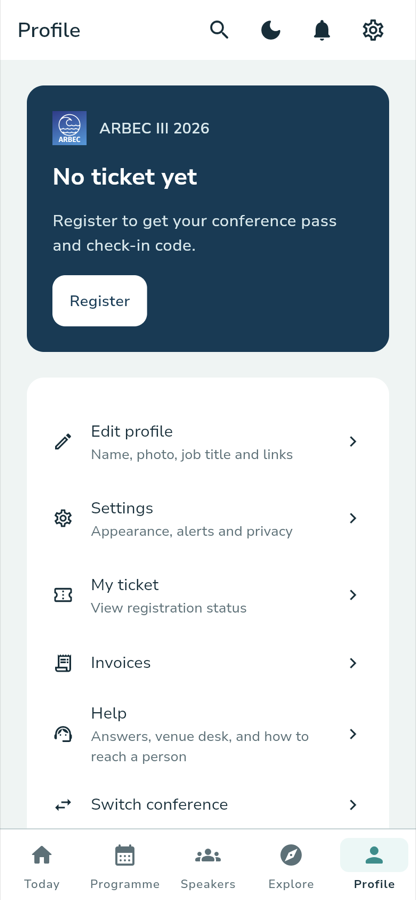
A pass card at the top, carrying the conference logo and name. Before you have registered, it says so and offers the way to fix it:
ARBEC III 2026 No ticket yet Register to get your conference pass and check-in code.
Register
Once a registration is confirmed the same card carries your name, a check-in
code and a QR code to present at the desk. If the credential cannot be
produced, the card reads Pass unavailable with a Try again — the app
never shows a sample or placeholder code.
Below it, a list of rows, each with a title and a one-line description:
Edit profileName, photo, job title and links.
SettingsAppearance, alerts and privacy. Also where the app version is shown.
My ticketView registration status.
InvoicesYour registration invoices.
HelpAnswers, venue desk, and how to reach a person.
Switch conferenceLeaves this conference and returns you to the list in Step 1.
What you tap
A gear icon in the top bar goes straight to Settings, the same place the Settings row does.
Signing out
Sign-out is on the Settings screen, under a line reading
Signed in as {your email}, with a Sign out button. Tapping it asks
first, because signing out means losing your pass and your saved sessions on
this device until you sign back in:
Sign out of ARBEC? You will need to sign back in to see your pass and saved sessions.
If sign-out cannot finish, the app says so rather than pretending:
Sign out could not finish safely. Your account may still be on this device. Try again.
Where you go next
That is the end of the journey. If something did not work, the Support FAQ covers the common cases and ARBEC Support has the contact details.
:::note Walked against the running app Captured on the local stack on 29 September 2026 at 390 px, signed in as the local attendee account, which has no registration — hence No ticket yet. :::