Step 4 — Today
/events/:editionUuid/todayThe first of the five tabs, and where the app lands after sign-in.
What you see
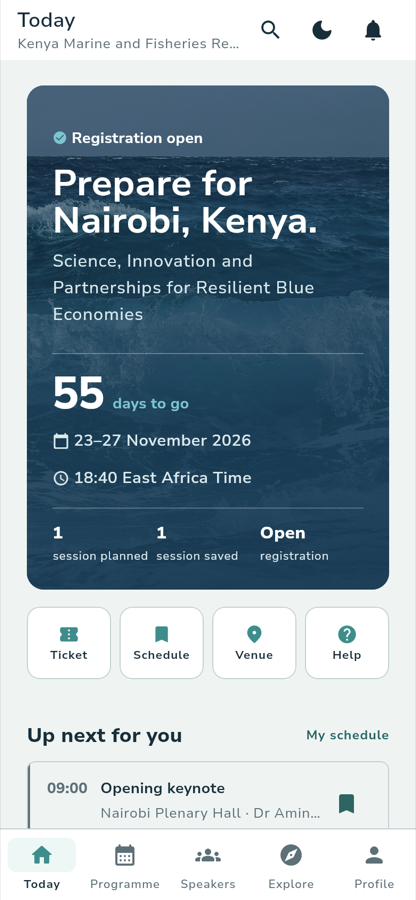
Under the top bar, which reads Today with the organizer's name beneath it, a full-width panel carries the conference's cover image and everything you check first.
Registration open Prepare for Nairobi, Kenya. Science, Innovation and Partnerships for Resilient Blue Economies
55 days to go 23–27 November 2026 18:40 East Africa Time
1 session planned 1 session saved Open registration
Before the conference the headline is built from the venue, and the paragraph
is the organizer's own summary. The countdown counts down to the first day:
Today / the conference opens on the day itself, Day 2 / of 5 · happening now while it runs, Thank you / for joining us after it ends. The clock
beside it is the local time at the conference. (The figures above are the
local ARBEC III dataset on 29 September 2026.)
The three figures under the rule change as the conference goes:
1 session plannedbecomes sessions held after it.
1 session savedyour saved count. 3 sessions saved once you have three.
Open registrationbecomes the venue while the conference runs.
What you see
Four tiles sit under the panel. Each is a shortcut, and each is a whole screen behind it.
TicketYour conference pass and check-in code.
ScheduleThe programme, filtered to what you have saved.
VenueAddress, map and arrival guidance.
HelpAnswers the organizer published, and how to reach the desk.
After the conference the same row changes to Replays, Feedback, Receipt and Archive.
Below the tiles, Up next for you lists the next session you have saved, with a My schedule link beside the heading. A slim announcement band carries the organizer's latest message when there is one — tap it to open the Message Centre, or the ✕ to dismiss it for the session.
Lower still, Before you go lists what is still outstanding, built from your registration and the dates the organizer published. With no registration and no upcoming dates, the section does not appear. And Your conference tools lists what your account can reach here, which for a plain attendee is usually short or empty.
What you tap
Schedule — the quickest route from opening the app to the sessions you came for.
What happens
The Programme tab opens, filtered to your saved sessions. Remove saved=1
from the URL to see the full programme.
Where you go next
:::note Walked against the running app Captured on the local stack on 29 September 2026, signed in as the local attendee account, at 390 px. The figures are that dataset, not fixed values — your own Today screen will show your own counts. :::