Step 6 — Save a session
/events/:editionUuid/sessions/:sessionIdTap a session in the programme and you land here. The bookmark is the point of this step; everything else is detail.
What you see
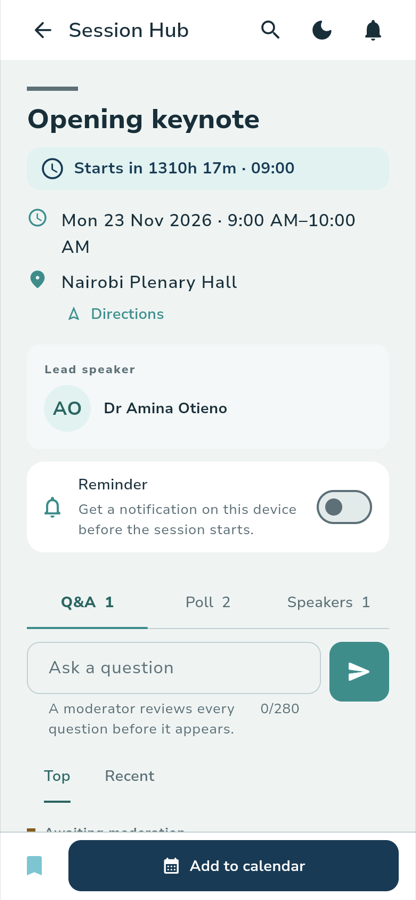
Opening keynote Starts in 1310h 17m · 09:00
Mon 23 Nov 2026 · 9:00 AM–10:00 AM Nairobi Plenary Hall Directions
Lead speaker AO Dr Amina Otieno
The banner counts down to the start, then the full date and time, then the room with a Directions link. Under that, the speakers — the first labelled Lead speaker — and a Reminder switch:
Reminder Get a notification on this device before the session starts.
What you see
Below the reminder, three tabs — Q&A, Poll and Speakers — each carrying a count. The first is open, with an Ask a question field and a send button:
Ask a question A moderator reviews every question before it appears. 0/280
Top · Recent
Questions you have asked wait under Awaiting moderation until a moderator approves them. Poll opens any live poll, and Speakers lists everyone on the session.
What you tap
The bookmarkPinned at the bottom-left of the action bar. Its tooltip tells you what the
tap will do — Save to my agenda when unsaved, Remove from saved programme
when saved. From a programme card the same control reads Save session and
Remove from saved programme.
The Reminder switchToggles a notification on this device. If notifications are off for the app, the switch says so rather than failing quietly:
Reminder saved, but notifications are turned off for this device. Allow notifications to be reminded.
A reminder cannot be set for a session with no published time, or one that has already started.
Add to calendarExports a calendar file for the session. The Programme actions menu — the
three dots in the top bar — also offers Add to calendar with Copy ICS
link, for subscribing to a feed that keeps your calendar in step with
programme changes.
What happens
The bookmark fills in and the session joins your saved programme. It persists across reloads and across devices, and your count appears on Today and as the Saved only chip in the programme.
If the session overlaps one you already saved, the app flags it rather than silently dropping either:
Schedule conflict detected 2 saved sessions overlap at 09:00 on Monday
Tap Resolve, then Keep this one on whichever you want. Both stay saved; you decide which to miss.
Once a session has run, a Rate session control appears. The form asks
How was this session? on a five-point scale from Poor through Fair,
Good and Very good to Excellent, with an optional
Comments (optional) box. Once answered, it reads Thank you — your response was recorded. and the control becomes Change response.
Where you go next
:::note Walked against the running app
Captured on the local stack on 29 September 2026 at 390 px. The countdown reads
1310h 17m because the conference is 55 days out; the count on the Q&A and
Poll tabs is that fixture's own data.
:::