Step 7 — Read the speakers
/events/:editionUuid/speakersThe third tab: the people on the programme, and the attendees who chose to be listed.
:::info The tab says Speakers
The label and the top bar both read Speakers. The older /people route
still resolves, and redirects here, so a link you were given with people in
it will work.
:::
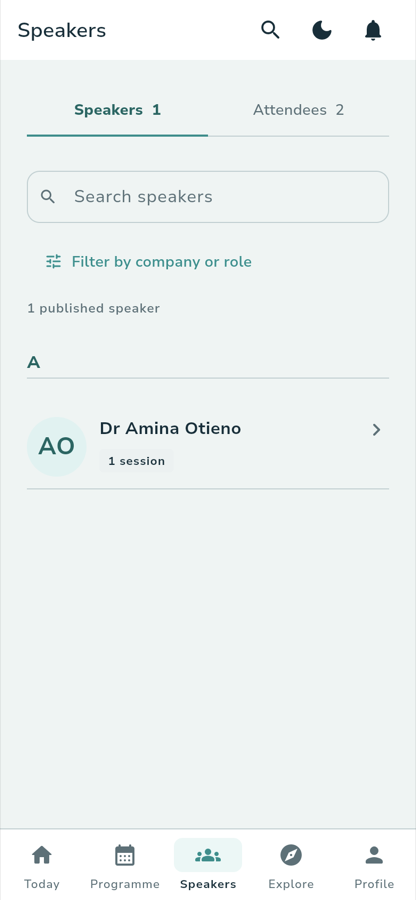
What you see
Two tabs carry counts:
Speakers 1 Attendees 2
Under them, a Search speakers field, a Filter by company or role link, and a count of what is published:
1 published speaker
A AO Dr Amina Otieno 1 session
The roster is grouped A–Z, with a section letter above each group. Each row carries the person's name, their session count, and a portrait — or their initials on a tinted disc when the organizer has not supplied one.
What you tap
A rowOpens that person's profile: their name as the top-bar title, a Share this
profile button, their biography, their affiliation, and a Sessions (n)
section listing the published sessions they appear in. With none yet, that
section reads No published sessions yet.
The search fieldTakes a name, company or job title.
Filter by company or roleOpens Company and Job title filters, each starting at Any company or
Any job title.
AttendeesOther attendees who have chosen to be listed. It is opt-in, and the empty state is explicit about it:
Nobody has opted in yet Attendees appear here once they choose to be listed in their profile privacy settings.
What you see
A conference whose programme has not been published yet says so instead:
The speaker list is not yet public Verified names and biographies will appear after the organizer publishes the programme.
Where you go next
:::note Walked against the running app
Captured on the local stack on 29 September 2026 at 390 px. The roster holds
one published speaker because that is what the local fixture has published;
backends/arbecapi/app/scripts/seed-attendee-speakers.mjs can fill it out to
eight named speakers.
:::