Step 5 — Read the programme
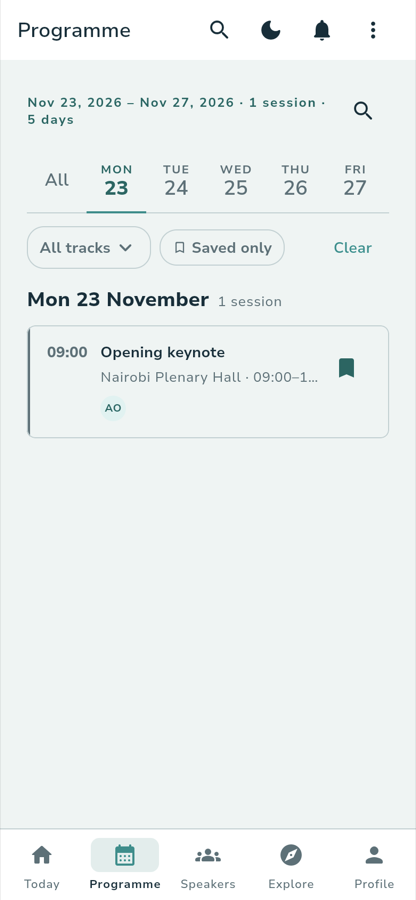
/events/:editionUuid/programmeThe second tab, and the reason most people open the app. Every published session, grouped by day.
What you see
A date range and a count sit at the top:
Nov 23, 2026 – Nov 27, 2026 · 1 session · 5 days
Then a day strip — All, then each day of the conference:
AllThe whole conference.
MON 23, TUE 24, WED 25, THU 26, FRI 27One per day. The app opens on the first day that has sessions.
Under that, a filter row: an All tracks dropdown, a Saved only chip, and Clear. Then the sessions, under a heading that repeats the day and its count:
Mon 23 November · 1 session
09:00 Opening keynote Nairobi Plenary Hall · 09:00–10:00
A session running right now carries a LIVE NOW badge. A saved session that clashes with another saved session is marked OVERLAP.
What you tap
A day in the stripNarrows the list to that day. All brings the whole conference back.
All tracksOpens the filter sheet, headed Filter Programme, with three sections —
Track, Format and Room — each starting on All tracks or
All rooms. Reset clears them, and the button at the foot counts what you
are about to see: Show 12 matching sessions.
Saved onlyShows only what you have bookmarked. It carries a count once you have some.
The search iconA field whose tooltip is Search the programme and whose placeholder is
Search sessions, rooms or speakers. It filters as you type, and the line
above the list counts the matches — 1 session matching across the conference, or 3 sessions matching…. A Search results header replaces
the day groups.
What you see
Three empty states worth knowing, because each is the app telling you something rather than showing a blank page.
A search that matches nothing:
No sessions match “fisheries” Try a track, room, speaker or part of a title.
A day the organizer left empty — excursions and side events are usually why:
No sessions on Saturday This day may be dedicated to excursions or side events. Explore side events for more details.
Filters that match nothing:
No sessions match these filters Clear filters to return to the full programme.
What you tap
A session card. That is Step 6.
What happens
Tapping a day scrolls to that day. Tapping a card opens the session's details,
and the address becomes /events/:editionUuid/sessions/:sessionId.
Where you go next
:::note Walked against the running app Captured on the local stack on 29 September 2026 at 390 px. The ARBEC III fixture publishes a single session, so the list is short; the layout is the same for a full programme. :::